
How to Track AI Search Traffic in GA4 (Step-by-Step Guide for 2026)
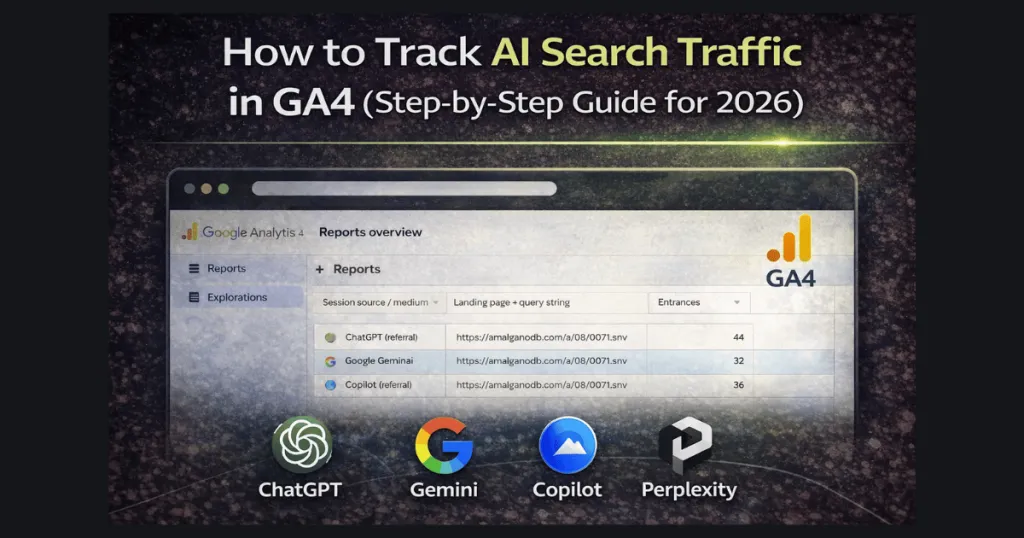
Key Takeaways
- AI tools are sending real traffic right now – traffic from ChatGPT, Perplexity, Claude, and Copilot are already driving visitors to websites
- GA4 doesn't automatically show AI traffic – You need to set up a custom Exploration to see where these visitors come from
- The Exploration method shows you exactly which pages AI recommends – See the specific content AI tools trust and how many clicks each page gets
- AI traffic is growing fast – Reports show AI-driven sessions jumped 527% year-over-year in 2025
- This traffic is often high-quality – Visitors from AI tools tend to be more engaged because they're getting specific recommendations
Why AI Search Traffic Matters for Your Business
People are changing how they search for information online.
Instead of typing into Google and clicking through the organic search ten blue links, many users now ask AI platforms like ChatGPT or Perplexity direct questions. These tools read through multiple sources and recommend specific pages that answer the question best.
Here's what most business owners don't realize yet:
AI tools are already sending traffic to websites—including yours. You're just not tracking it.
When someone asks an AI chatbot:
- "What's the best plumber in Atlanta?"
- "How much does a new roof cost in Georgia?"
- "Where can I find a personal injury lawyer near me?"
The AI might recommend your website as a trusted source. When that person clicks through, that's real website traffic.
The difference? Unlike Google rankings, AI tools recommend specific pages, not entire websites. They look for pages that clearly answer questions and provide helpful information.
The Numbers Tell the Story
According to recent industry research from Search Engine Land:
- AI-driven website sessions grew 527% year-over-year in early 2025
- ChatGPT referrals jumped from around 600 visits per month to over 22,000 by May 2025
- 63% of websites are already receiving traffic from AI tools
- ChatGPT alone drives 50% of all AI referral traffic
If you're not tracking this traffic, you're missing a major piece of your marketing picture. This is especially critical for local SEO strategies where understanding all traffic sources matters.
What Is AI Referral Traffic?
AI referral traffic acquisition means website visits that come from AI search tools and chatbots.
The most common sources include:
- ChatGPT (chatgpt.com or openai.com)
- Perplexity AI (perplexity.ai)
- Claude (claude.ai)
- Google Gemini (gemini.google.com)
- Microsoft Copilot (copilot.microsoft.com)
- Meta AI (meta.ai)
- Mistral AI (mistral.ai)
- DeepMind (deepmind.com)
Important note: This is different from Google's AI Overviews (the AI-generated summaries at the top of Google search). Traffic from AI Overviews still shows up as organic Google traffic. What we're tracking here is ai-driven traffic from standalone AI tools.
If you want to optimize for both AI Overviews AND AI chatbots, check out our complete AI Search Optimization services.
How AI Traffic Shows Up in GA4
By default, GA4 groups AI traffic under "Referral" along with all other website referrals. This makes it nearly impossible to see:
- Which AI tools are sending visitors
- How much traffic comes from AI versus other sources
- Which exact pages AI tools are recommending (this is the most valuable insight)
- Whether AI visitors are converting into customers
That's why we need to set up a custom Exploration.
How AI Traffic Reaches Your Website
Here's how the process works:
- A user asks an AI tool a question about a product, service, or problem
- The AI searches across the web looking for the best answer
- The AI recommends specific pages that directly answer the question
- The user clicks the recommendation and visits your website
- Real website traffic is created that shows up in GA4
The key insight: AI tools don't recommend entire websites—they recommend individual pages.
This means if you have a page that clearly answers "How much does well drilling cost in Georgia?" that specific page might get recommended, even if your homepage never shows up.
How to Track AI Traffic in GA4 (Complete Setup)
The Exploration method gives you the clearest view of your AI traffic. It shows exactly which AI platforms send visitors, which pages they're landing on, and how many clicks each page gets.
What you'll see after setup:
- Traffic from each AI tool (ChatGPT, Perplexity, Claude, etc.)
- The exact pages being recommended by AI
- How many entrances and views each page gets from AI sources
- Which AI platforms drive the most engagement
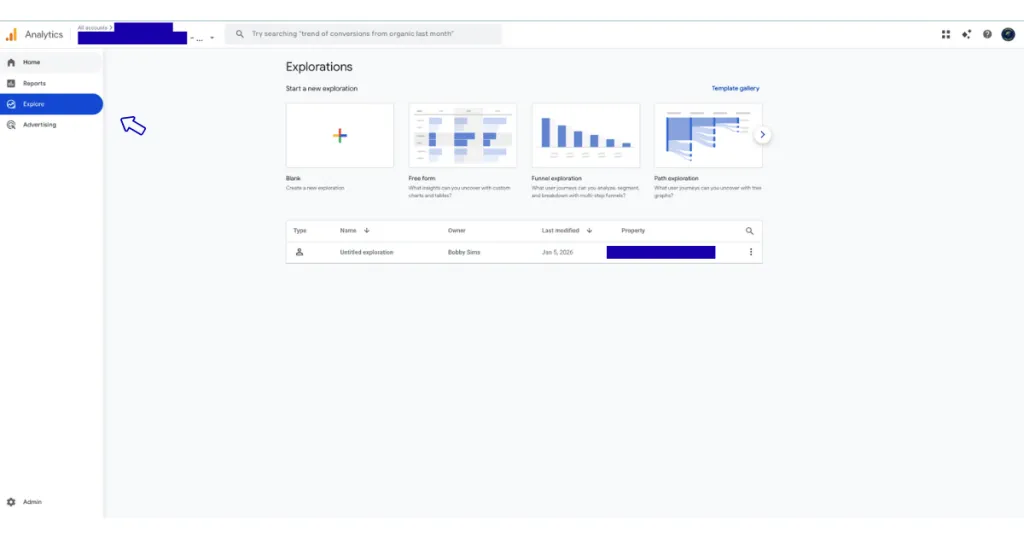
Step 1: Open GA4 Explorations
- Log into your Google Analytics 4 account
- Click Explore in the left sidebar
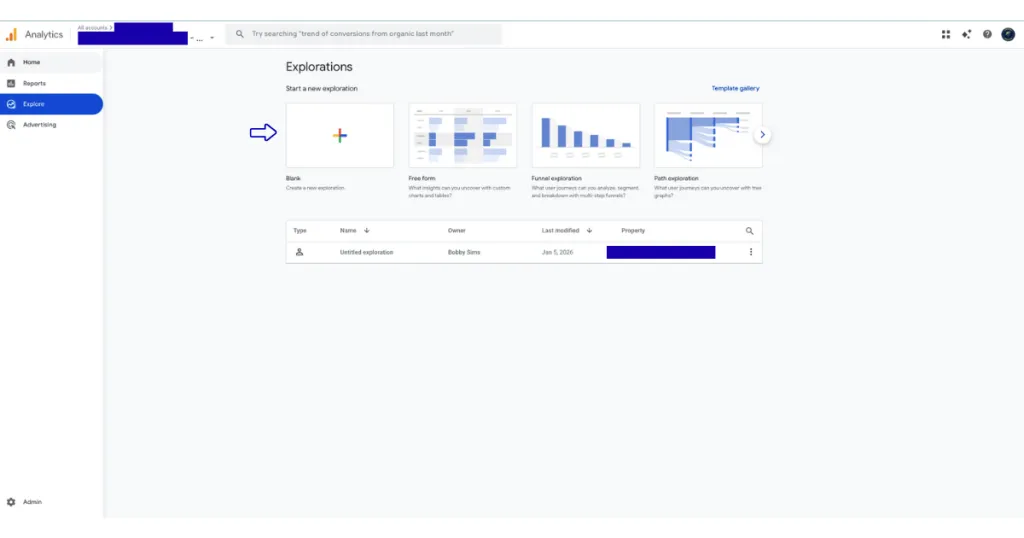
- Click Blank to start a new Exploration
Step 2: Name Your Report and Set Date Range
- At the top left, click "Untitled exploration"
- Name it "AI Traffic Analysis" or something similar
- Set your date range to Last 12 months to see the full trend
Why 12 months? AI traffic is recent for most sites. A longer date range helps you see growth patterns and seasonal trends.
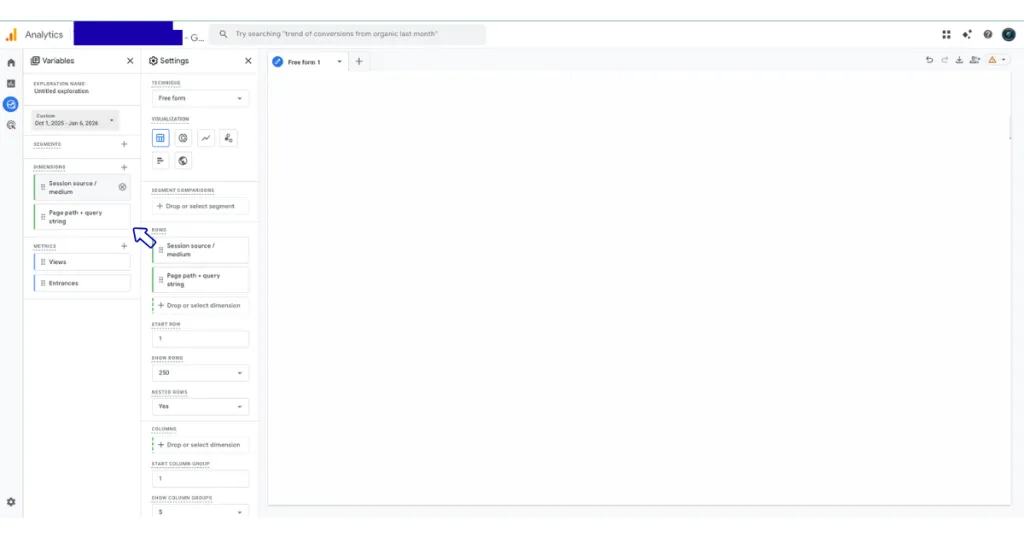
Step 3: Add Your Dimensions
Dimensions tell GA4 what information to track. We need two specific dimensions:
- Click the + button next to DIMENSIONS
- Use the search box to find and select:
- Session source / medium
- Page path + query string
- Click Import
What these do:
- Session source / medium = Shows where traffic came from (like "chatgpt.com / referral")
- Page path + query string = Shows the exact page URL visitors landed on
Step 4: Add Your Metrics
Metrics are the numbers you want to measure:
- Click the + button next to METRICS
- Search for and select:
- Views
- Entrances
- Click Import
What these mean:
- Entrances = How many times this was the first page someone visited
- Views = Total number of times the page was viewed (including people who navigated to it from another page)
Step 5: Configure Your Rows (This Is Important)
Now we'll set up how the data displays:
- ROWS: Drag Session source / medium here first
- ROWS: Then drag Page path + query string under it
- Turn on Nested rows: Yes (this shows pages under each traffic source)
- Set Show rows: 250 (to see more results)
This nested structure lets you see:
- Which AI tool sent traffic to your site
- Then expand to see which exact pages that tool recommended
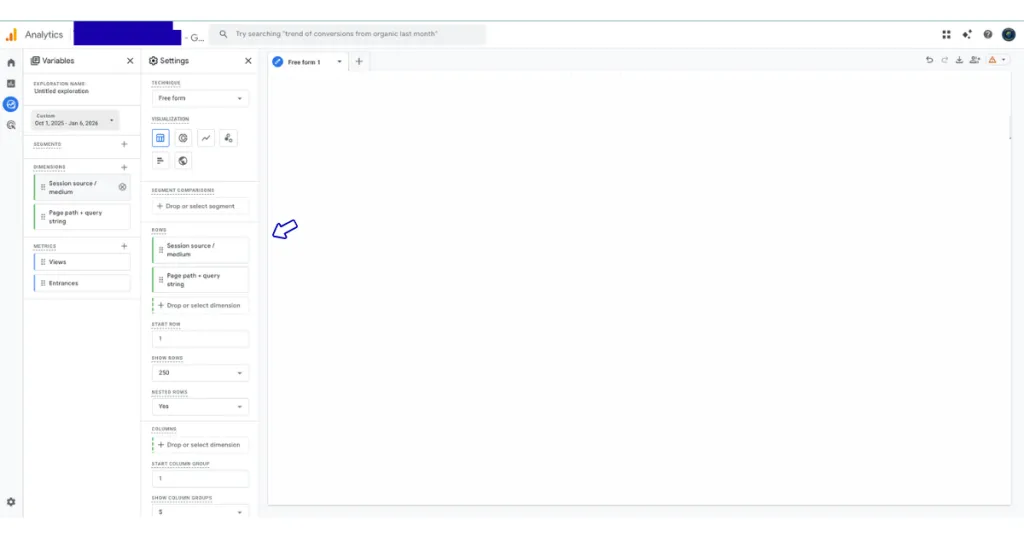
Step 6: Add Your Values
- VALUES: Drag Entrances here
- VALUES: Drag Views here
Now you'll see the numbers for each source and page.

Step 7: Filter for AI Traffic Only
This is the most critical step. We'll create a filter that only shows traffic from AI tools:
- In the FILTERS section, click Drop or select dimension
- Choose Session source / medium
- Set the condition to matches regex
- Copy and paste this exact code:
.*chatgpt.*|.*openai.*|.*neeva.*|.*writesonic.*|.*nimble.*|.*outrider.*|.*perplexity.*|.*edgeservices.*|.*gemini.*google.*|.*copilot.*|.*claude.*|.*mistral.*|.*meta.*|.*jasper.*|.*deepmind.*|.*copy.*ai.*- Click Apply
What this does: This regex code tells GA4 to show only traffic from these AI platforms. The | symbol means "or" – so it's looking for any of these sources in your traffic data.

Step 8: Review Your Results
You should now see a clean report showing:
- Each AI tool that sent traffic
- Click the arrow next to any source to expand and see which exact pages were recommended
- Entrances and views for each page
- Total traffic from all AI sources combined
This is the goldmine: You can now see exactly which pages on your site AI search engines trust enough to recommend to users.

If you don't see any data yet:
- This is normal for many sites—AI traffic is still growing
- Check back in a few weeks as this channel develops
- Make sure your site is answering real customer questions clearly (AI tools love helpful, direct content)
Understanding Your AI Traffic Data
Once you have data flowing in, here's what to look for and what it means:
1. Which AI Tools Send the Most Traffic?
You'll likely see the most popular AI platform, ChatGPT, leading by a wide margin—it drives about 50% of all AI traffic currently. But watch for:
- Perplexity – Often sends highly engaged visitors who are doing deep research
- Claude – Growing rapidly among tech-savvy users and professionals
- Copilot – Integrated into Microsoft products, so it catches enterprise users
- Gemini – Google's AI tool, increasingly used for quick research
2. Which Pages Are Being Recommended? (The Most Valuable Insight)
Click the arrow next to any AI source to expand and see the exact pages getting traffic.
This tells you:
- What content AI tools trust and recommend
- Which pages clearly answer customer questions
- What topics you should create more content about
- Pages that might need improvement if they're not appearing
Common pattern we see: Service pages with clear explanations, specific pricing information, and real customer examples tend to get recommended more often than vague "about us" pages.
3. Entrances vs. Views: What's the Difference?
- Entrances = How many times this page was the first page someone visited from AI
- Views = Total views including people who navigated to it from another page
If a page has high entrances from AI, that means AI tools are directly recommending it as the answer to user questions. This is what you want to see to be able to track and analyze.
4. Is AI Traffic Converting?
While this basic Exploration doesn't show conversions directly, you can add them:
- Go back to METRICS
- Add Key events or Conversions
- Drag it to VALUES
Many businesses report that AI traffic converts at higher rates than average because:
- Visitors got a personal recommendation from AI
- They're further along in their research process
- The AI pre-qualified your business as a solution to their problem

What This Data Tells You About Your Content
The pages that show up in your AI traffic report are doing something right. Here's what makes content AI-friendly:
Pages AI Tools Love to Recommend:
- Clear, direct answers to specific questions
- Well-organized content with headers and sections
- Specific information (prices, timelines, processes)
- Real examples and case studies
- Simple language without jargon
- Focused topics (one main question per page)
Pages AI Tools Usually Skip:
- Vague, generic content
- Pages that dance around the actual answer
- Overly salesy content without substance
- Content stuffed with keywords but lacking real value
- Pages that require clicking through to other pages to find the answer
Action step: Look at the pages getting AI traffic. What do they have in common? Use that pattern for new content.
Common Questions About Tracking AI Traffic
"I'm not seeing any AI traffic. Is something wrong?"
Not necessarily. Several reasons you might not see AI traffic yet:
- Your market hasn't shifted to AI search – Some industries and demographics are slower to adopt
- Your content isn't optimized for AI – AI tools prefer clear, question-focused content
- You don't have enough total traffic – AI is still only a small percentage of average website traffic
- The timeframe is too short – Try extending to 12 months
- Your pages don't answer complete questions – AI tools want full answers, not partial info
"Some traffic shows up as (not set). What does that mean?"
This happens when:
- Someone left your site open in a browser tab for a long time and the session timed out
- GA4 couldn't capture complete tracking data for technical reasons
- There were tracking script issues at the moment of the visit
This is normal and not a major concern. Focus on the sessions where you can see clear source data.
"Can I track Google AI Overviews with this method?"
No—traffic from Google's AI Overviews (the AI summaries at the top of Google search results) still appears as organic Google traffic in GA4. That requires a completely different tracking method involving Google Tag Manager.
What this Exploration tracks is traffic from standalone AI tools like ChatGPT, Perplexity, and Claude—which is what most businesses should focus on first.
"The regex code looks complicated. What if I want to add a new AI tool?"
The regex pattern is simpler than it looks. To add a new AI tool:
- Find the domain name (like "newai.com")
- Add it to the end of the code:
|.*newai.* - Update your filter
The .* before and after just means "match anything with this text in it."
"Is AI traffic going to replace Google search?"
No time soon. Google still drives 345 times more traffic than all AI tools combined.
But AI is growing fast, and the quality of AI traffic can be higher than average organic traffic because visitors are pre-qualified by the AI's recommendation.
The smart strategy? Optimize for both traditional SEO and AI visibility. The good news is the same content works for both.
What to Do With This Information
Tracking AI traffic in Google Analytics 4 isn't just about numbers—it's about understanding how people discover your business and what content they trust.
Immediate Actions (This Week):
- Set up the Exploration following the steps above
- Check which pages (if any) are getting AI traffic
- Note which AI platforms are sending visitors
Short-Term Actions (This Month):
- Analyze your top-performing pages – What makes them good enough for AI to recommend?
- Identify content gaps – What questions aren't you answering yet?
- Create 2-3 new pages answering real customer questions clearly and completely
- Update existing pages that should be getting AI traffic but aren't
Long-Term Strategy (This Quarter):
- Review AI traffic trends monthly – Is it growing? Which sources are rising?
- Compare conversion rates – How does AI traffic convert vs. organic or paid?
- Build a content calendar around questions your customers actually ask
- Monitor which topics AI tools favor in your industry
AI Visibility Is Modern SEO
Here's the truth about where SEO is heading in 2026:
Traditional SEO focused on:
- Keyword rankings
- Backlinks
- Domain authority
- SERP position
Modern SEO includes all of that, PLUS:
- AI visibility – Which AI tools recommend your content
- Answer quality – How clearly you answer real questions
- Page-level trust – Each page earning its own recommendations
- Content depth – Comprehensive answers vs. surface-level content
The businesses winning in 2026 are the ones who:
- Track AI visibility early (like you're doing now)
- Understand which pages AI trusts and why
- Create genuinely helpful content that answers real questions
- Measure results and adjust based on actual data
You've taken the first step by learning to track and monitor AI traffic. Now use that data to build content that both humans and AI trust.

Get Help Tracking AI Visibility
At Kingdom Creativez, we help local service businesses in McDonough, Henry County, and Greater Atlanta understand where their traffic really comes from—including emerging channels like AI search.
We can help you:
- Set up complete AI traffic tracking in GA4
- Analyze which pages AI tools recommend and why
- Optimize your content for both traditional SEO and AI visibility
- Create question-focused content that gets recommended to potential customers
- Build SEO strategies for 2026—not 2016
Want to see what AI tools are saying about your business?
Contact Kingdom Creativez for a free AI visibility analysis. We'll show you:
- Whether AI tools are currently recommending your business
- Which competitors are getting AI visibility in your market
- Opportunities to get recommended for high-value search queries
Contact UsView Our SEO Services
Final Thoughts
AI search tools aren't replacing Google—they're creating a new way for people to discover businesses.
The gap between businesses tracking this traffic and those ignoring it is growing every month. By January 2026, most businesses still aren't tracking AI traffic. That gives you a significant advantage.
Remember these key points:
- AI traffic is real and growing – It's not hype; it's showing up in analytics
- The Exploration method shows you everything – Which AI tools, which pages, how many clicks
- Page-level recommendations matter most – Focus on creating pages that answer complete questions
- This works alongside traditional SEO – You're not replacing your strategy, you're expanding it
- Start tracking now – The earlier you start, the more data you'll have to make smart decisions
You've learned how to track AI traffic. Now it's time to use that insight to grow your business in 2026 and beyond.
Questions about tracking AI traffic in GA4? Reach out to our team at Kingdom Creativez—we're here to help local businesses succeed in this changing landscape.
Article last updated: January 2026
By Bobby Sims, Kingdom Creativez Marketing
Serving McDonough, Henry County & Greater Atlanta